real time mobile tracking solution for construction material logistics.


Nov 2016 – Feb 2019

USLBM, one of the largest building materials distributors in the U.S., needed a better way to manage last-mile delivery visibility. Contractors and site managers struggled with delays, missing materials, and limited communication with suppliers.

As UX/UI Designer, I spearheaded the end-to-end design of a mobile application that brought GPS-powered delivery tracking, instant messaging, and proof-of-delivery into one seamless experience.
My Role

Technical Leader - UX/UI

Stakeholders

UX/UI Designer, Ionic framework Developers, Business Analyst and Architect

Company

USLBM Holdings, LLC. (USA)

Tools

Figma, Adobe XD, Adobe Photoshop, Miro, Jira and Confluence

Problem → Solution (Overview)

USLBM lacked a digital solution for tracking material deliveries—forcing contractors and site managers to rely on calls, emails, and guesswork. This led to delays, disputes, and scattered communication across job sites.

Problems Identified
  • Deliveries lacked real-time visibility, forcing users to rely on manual calls for updates.
  • Delivery confirmations were informal, leading to frequent disputes over incomplete or missed drop-offs.
  • Communication between contractors and suppliers was scattered across phone, email, and texts.
  • Invoices and financial records were difficult to manage, especially across multiple job sites.
  • Promotions and events from suppliers were often missed due to lack of digital reach.
UX Solutions
  • Introduced a live GPS-based tracking system to give users real-time delivery visibility.
  • Implemented photo + timestamp proof of delivery for verification and accountability.
  • Built an in-app messaging platform to centralize communication per delivery.
  • Created a billing dashboard to access invoices, statements, and payment history.
  • Added a promotions and events section to keep users informed and engaged.

Research

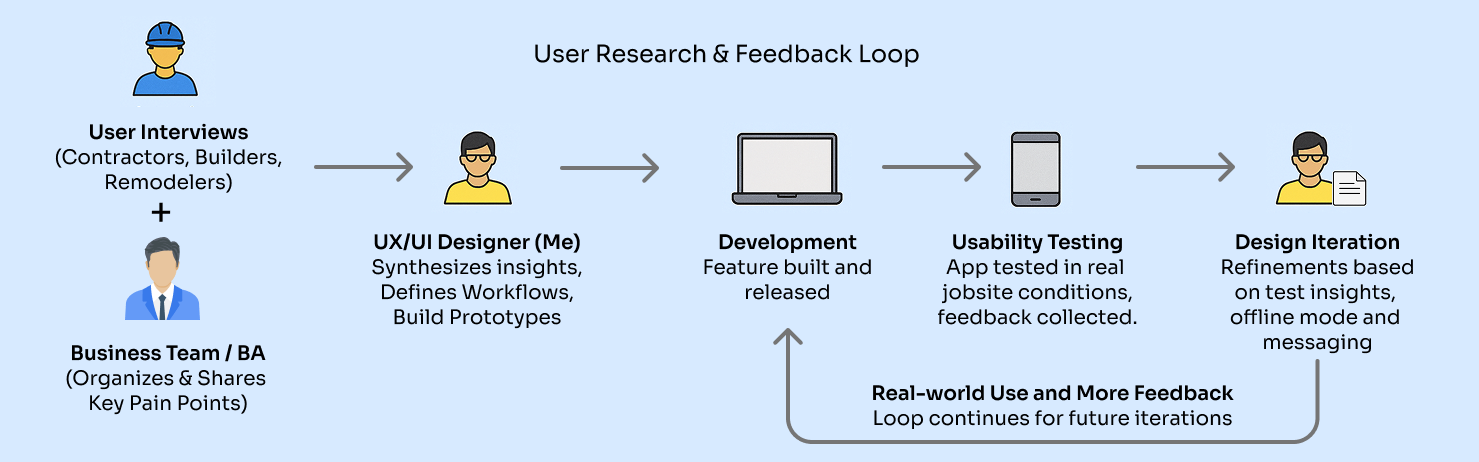
USLBM began with user interviews conducted by the client to gather insights from contractors, builders, and engineers. These insights were used to define the business requirements, which were then shared with me.

Based on those, I designed the UX/UI from the ground up and worked closely with developers to bring the app to life. After launch, the app was tested in the field, and user feedback helped identify areas for improvement, leading to design refinements.

These insights shaped key features like:

These updates ensured the product aligned with actual jobsite workflows.

User Persona
Scott
Scott Wallace

41, Project Site Manager

Background

Michael oversees operations across multiple construction sites. He coordinates crews, manages daily schedules, and ensures that materials arrive on time to keep projects moving. Delivery delays or missing items directly impact productivity and budgets, so he’s constantly following up with suppliers to track materials and resolve issues.

Goals
  • Monitor material deliveries in real time
  • Get clear proof of delivery to avoid disputes
  • Communicate quickly with drivers and suppliers
  • Access past delivery records and invoices easily
  • Keep projects on track by reducing delivery friction
Frustrations
  • Uncertainty around when deliveries will actually arrive.
  • Wastes time making phone calls for updates.
  • Deliveries show up with missing or wrong items.
  • Delivery confirmations are inconsistent or undocumented.
  • Struggles to track down invoices and payment history across projects.
Needs
  • Real-time GPS tracking of deliveries
  • Photo + timestamp-based delivery verification.
  • Simple, centralized communication within the app.
  • Easy access to billing and delivery history.
  • Fast issue reporting workflow directly from jobsite.
Devices Used

Tablet and Mobile

Design

I focused on designing the core user experience from scratch—shaping flows like delivery tracking, proof of delivery, issue reporting, and billing to reflect real-world jobsite workflows.

Design Objectives

Guided by field feedback and early user insights, I aimed to create a system that was:

Streamline Delivery Tracking
Live GPS with delivery status and ETA visibility
Accelerate Issue Reporting
One-tap issue logging with photo upload from the field
Improve Delivery Verification
Photo + timestamp proof with optional signature capture
Simplify Billing Access
Quick access to invoices, job balances, and payment history
Modular, Scalable UI
Flexible design system ready for future logistics features
Built for the Field
Optimized for contractors, builders, and site managers on the move
UI Workflow Enhancements

Since USLBM was built from the ground up, I focused on designing clean, efficient workflows that reflected real-world jobsite behavior. Key enhancements included:

This approach allowed me to deliver a scalable, role-aware experience that felt intuitive from day one—and was easy for developers to implement and extend.

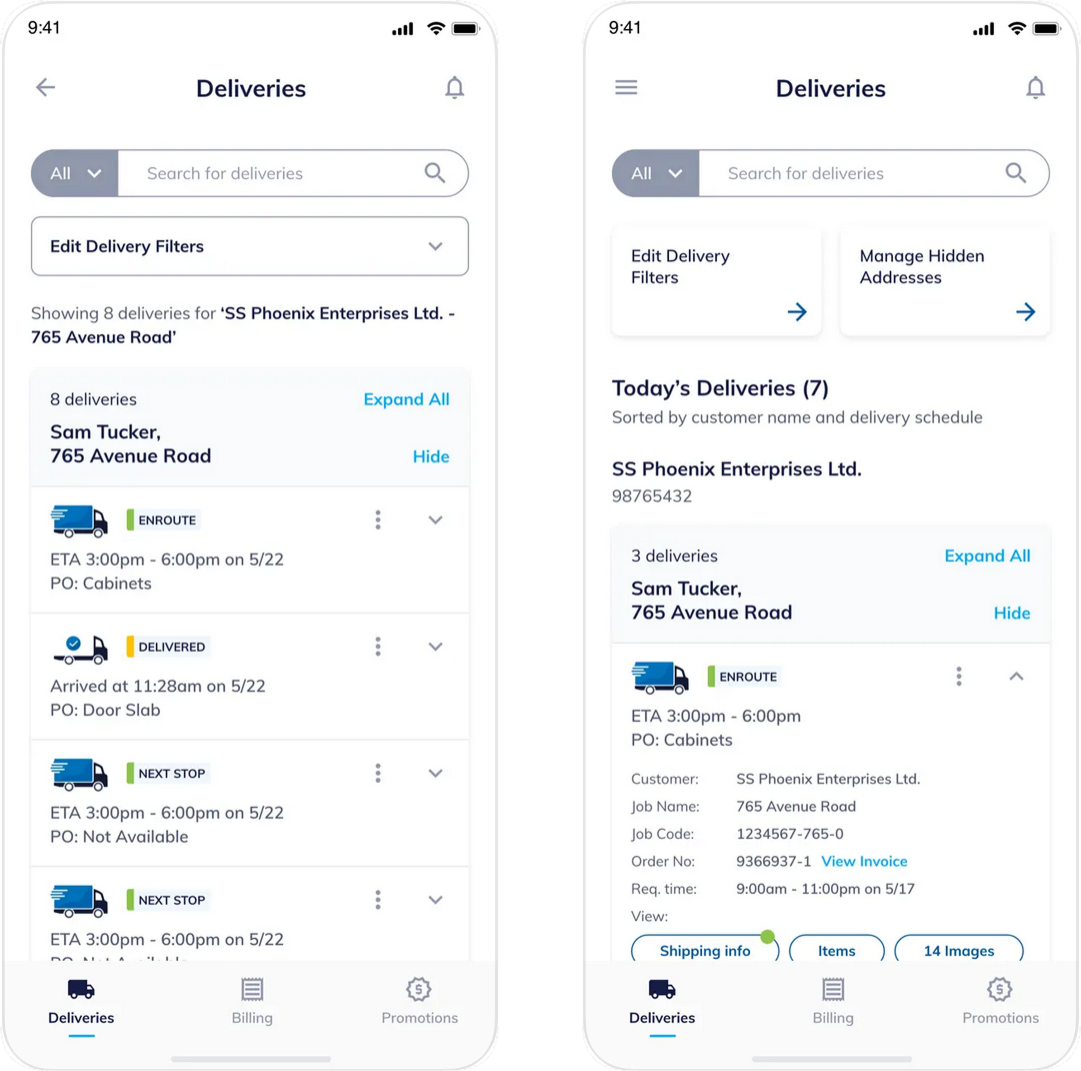
Design Feature 1: Delivery Card with Status Indicators & Action Tabs

What I did:
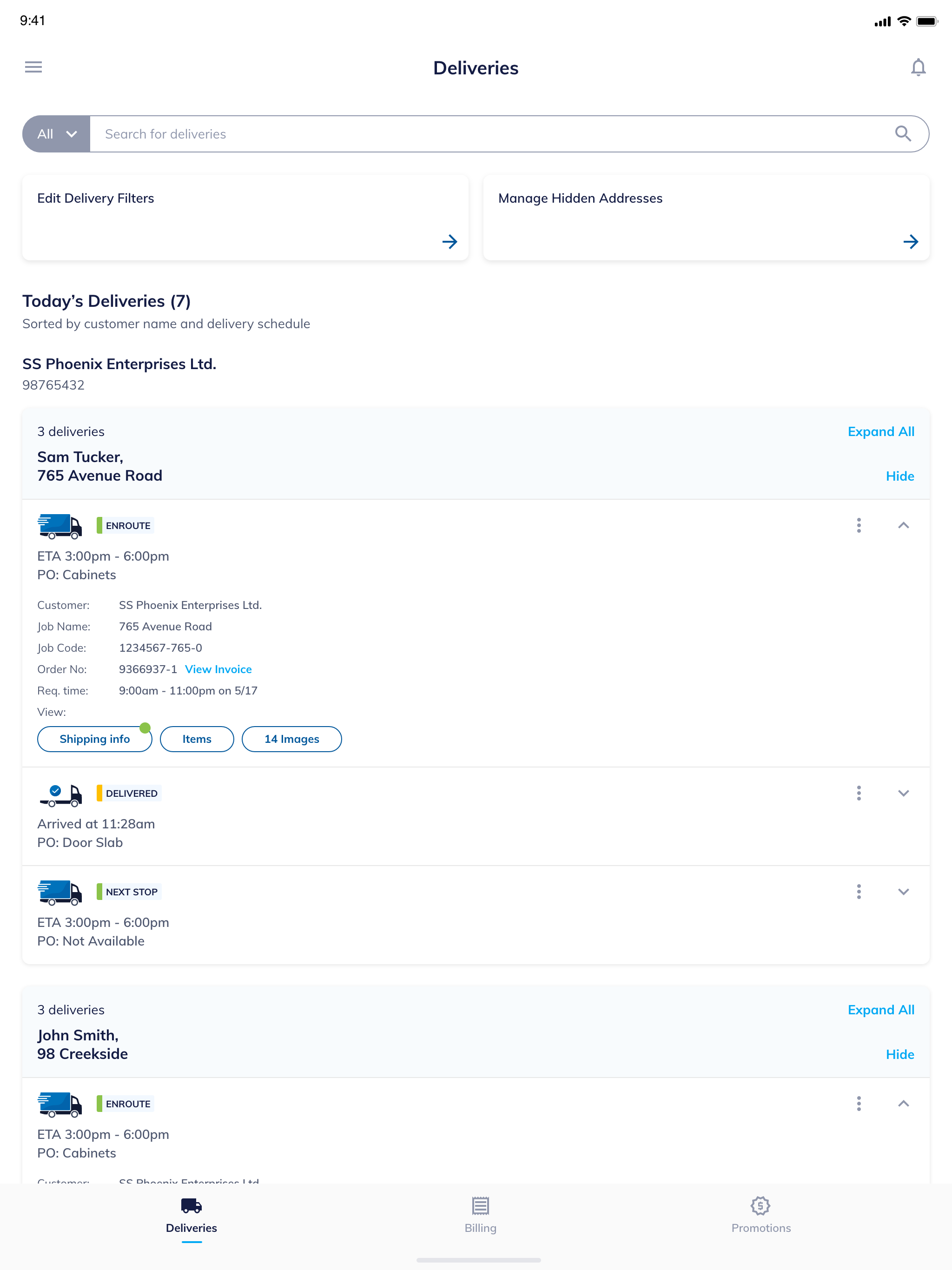
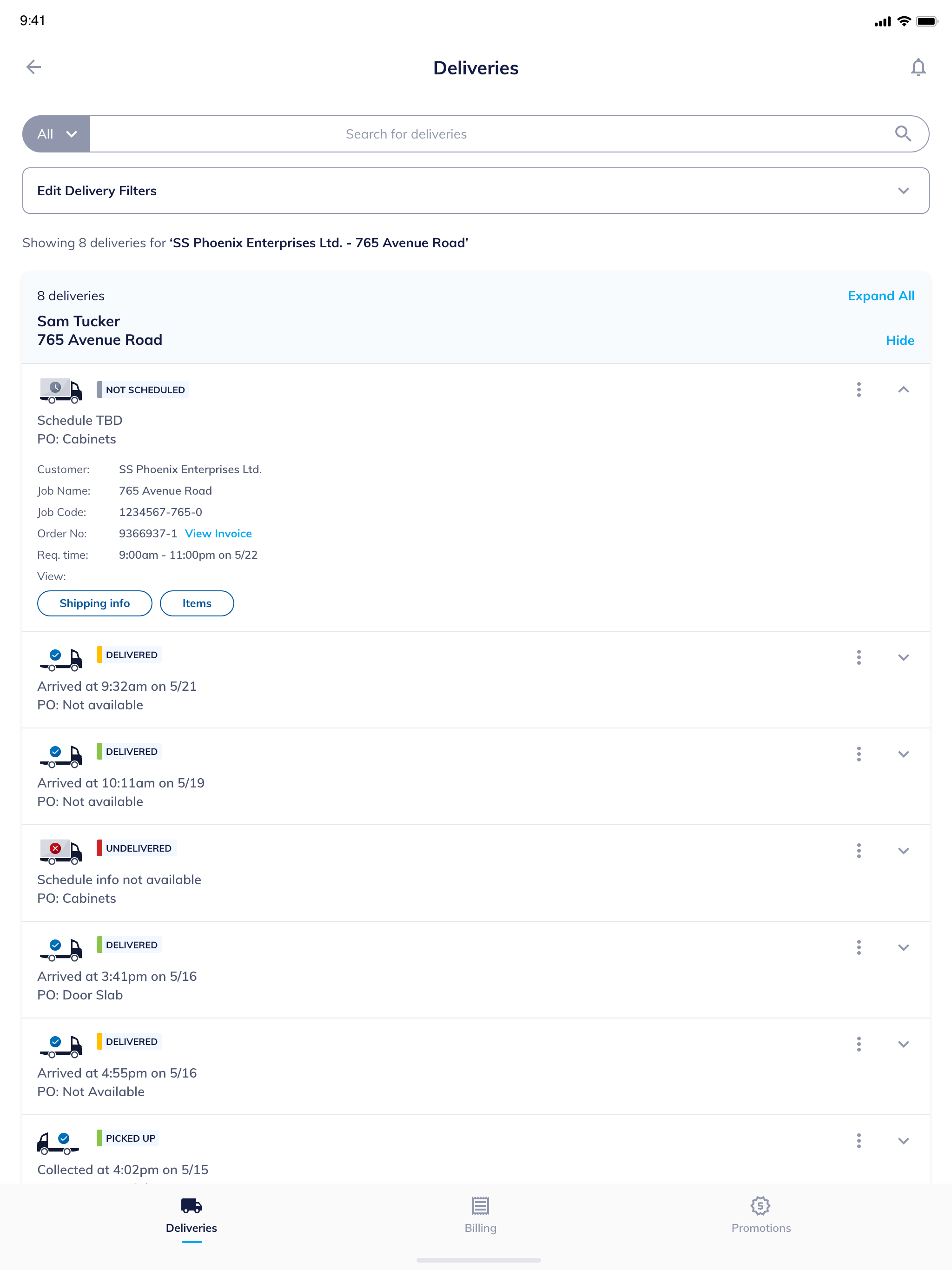
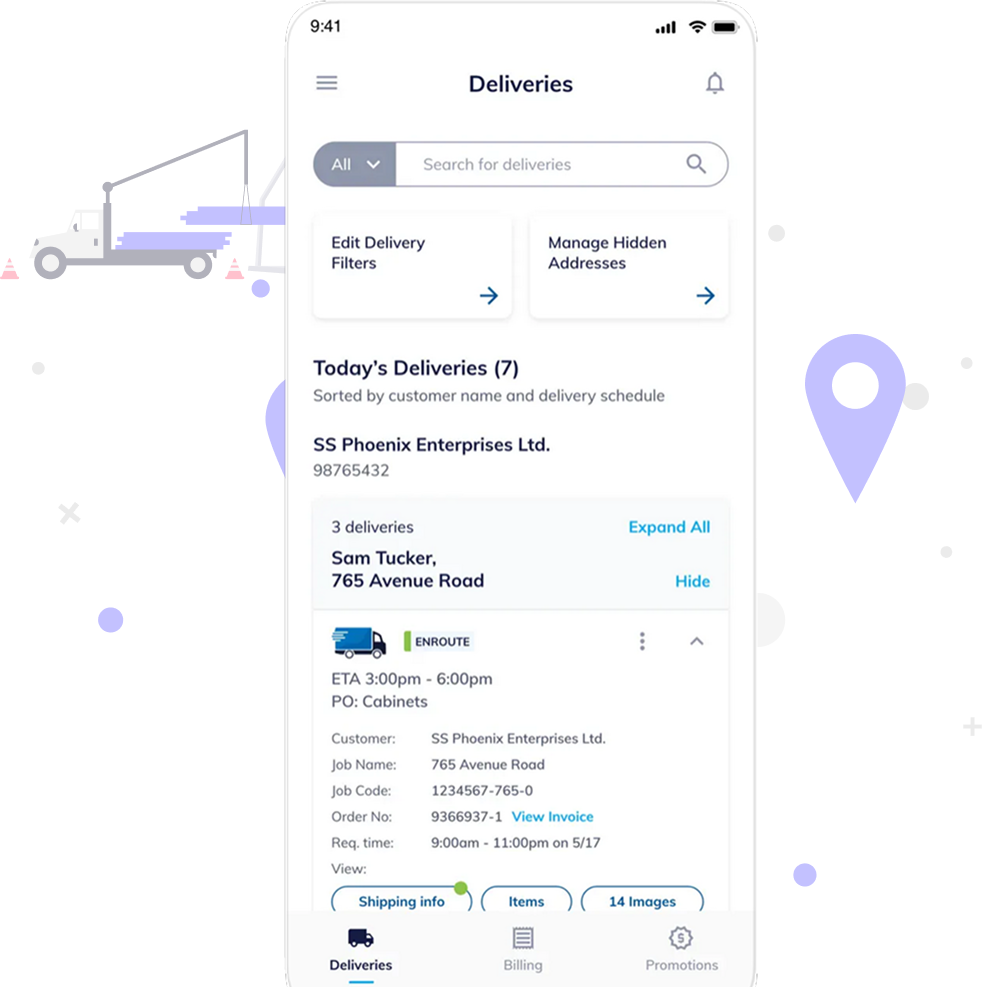
I designed a compact yet informative delivery card UI that shows the delivery status (Enroute, Delivered, Next Stop), ETA, PO info, and quick-access tabs for shipping info, items, and delivery images.

Why it matters:
This layout helps jobsite managers instantly assess what’s arriving, when, and what’s included—reducing the need to open multiple screens or make follow-up calls. The status tags are color-coded and visible at a glance, enhancing speed and clarity.

Delivery
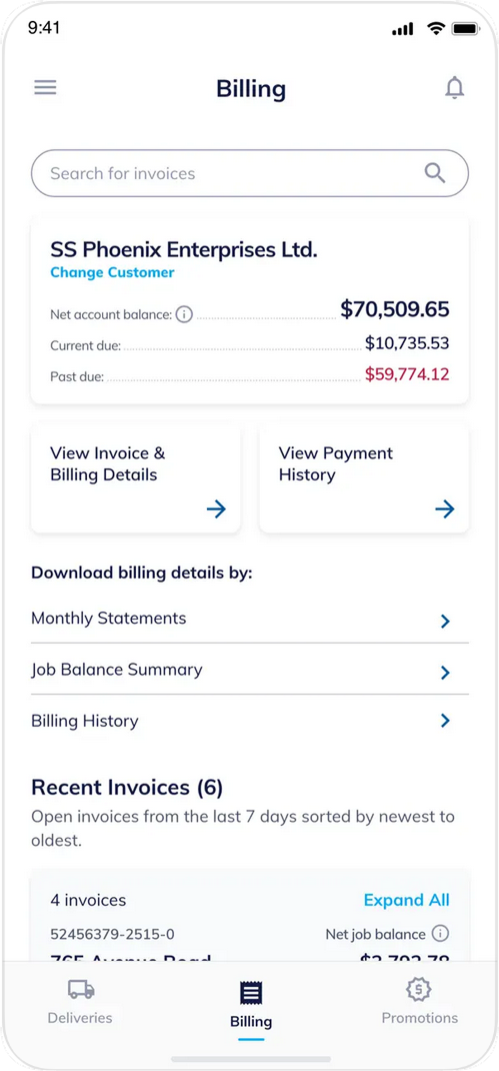
Design Feature 2: Billing Overview with Job-Based Filtering

What I did:
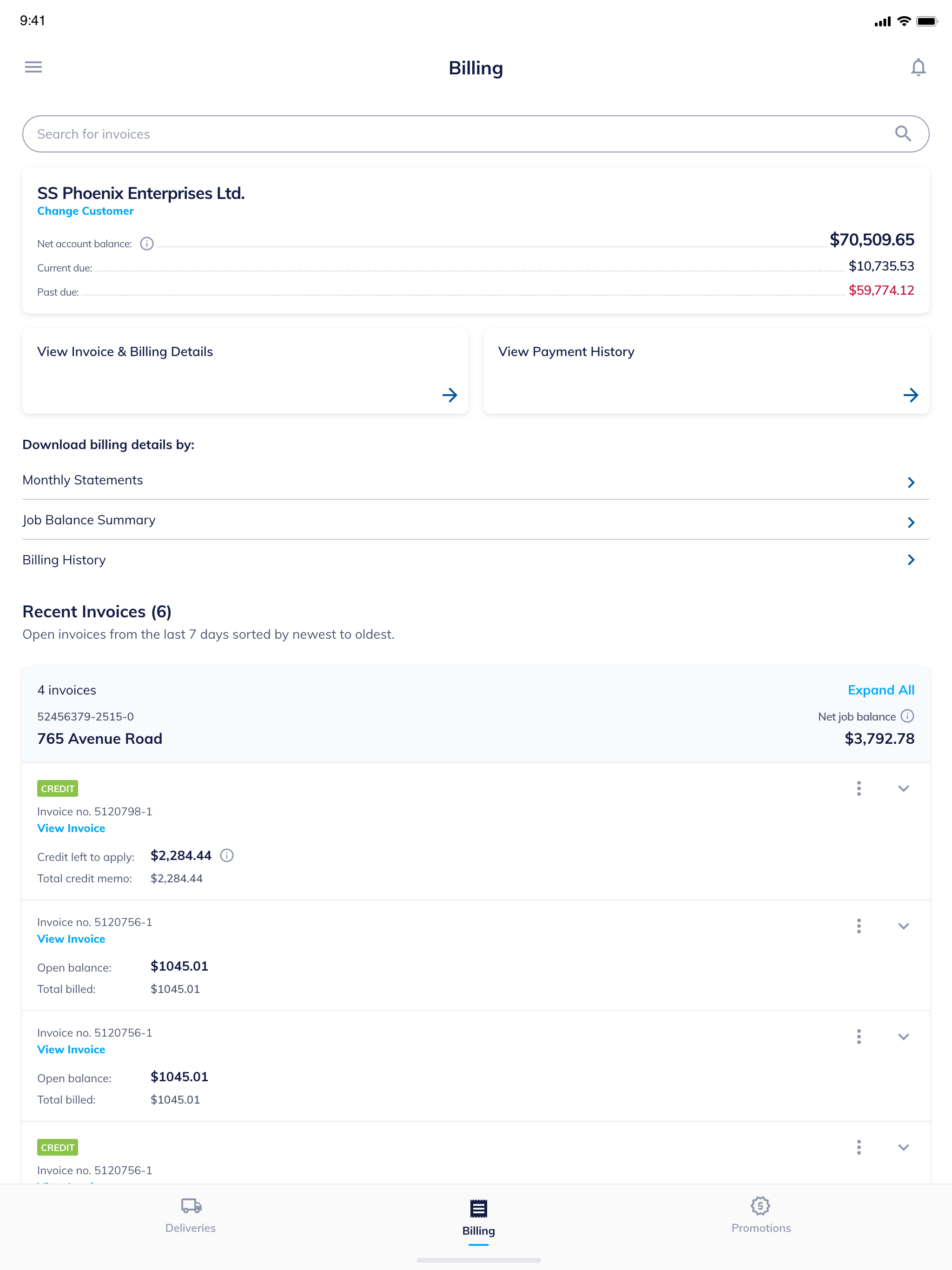
I created a billing dashboard that summarizes current, past due, and total balances by customer/job address. The user can drill down to detailed invoices and switch between payment history, statements, or summaries.

Why it matters:
Instead of digging through paper trails or calling for reports, contractors now get all financials in one place. This dramatically reduces billing confusion and increases trust with centralized visibility.

Billing
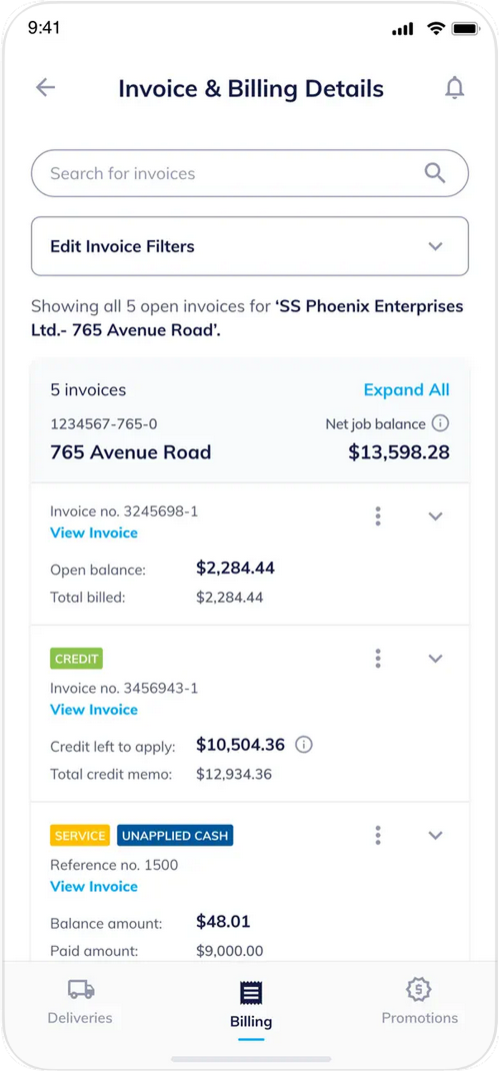
Design Feature 3: Invoice Details with Smart Labeling (Credit, Service, Unapplied Cash)

What I did:
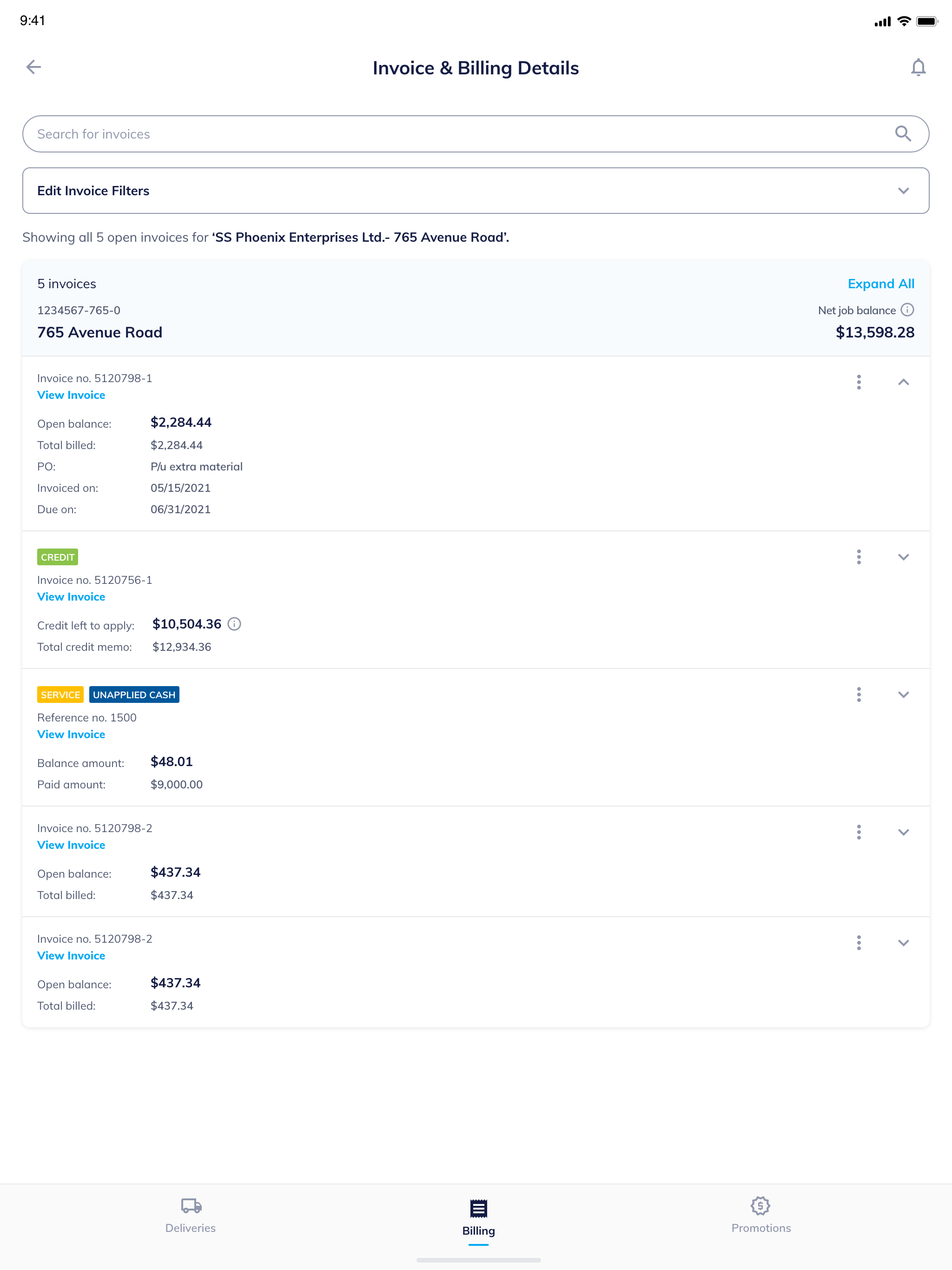
I designed labeled invoice cards that clearly distinguish different invoice types—like credit memos, service charges, and unapplied payments—with expandable sections for viewing details.

Why it matters:
This visual segmentation makes it easy for non-finance users to quickly understand the type and purpose of each transaction. It supports faster payment verification and reduces user errors.

Billing
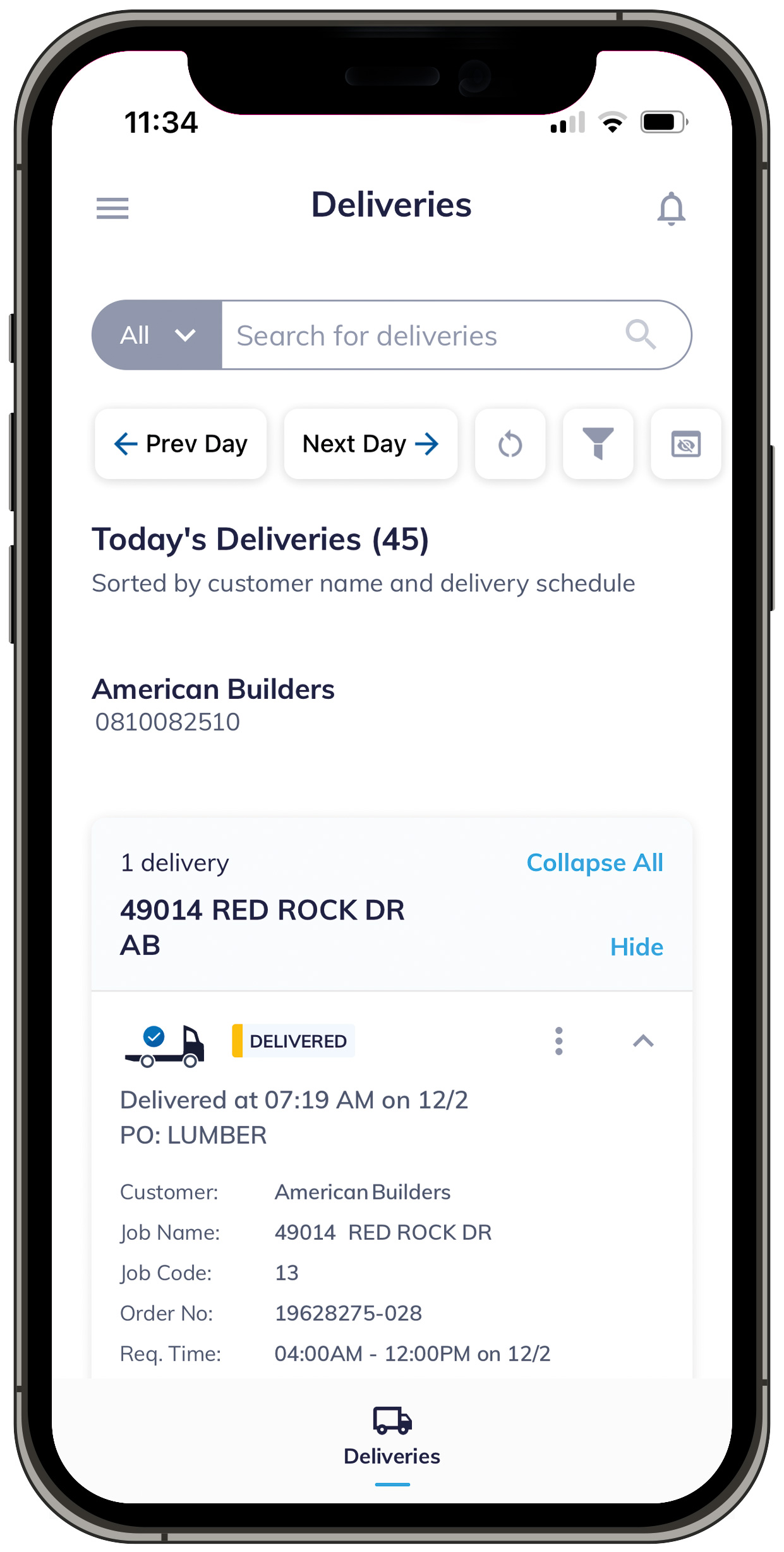
Design Feature 4: Persistent Bottom Navigation for Role-Based Access

What I did:
I introduced a simplified bottom tab bar with three primary actions: Deliveries, Billing, and Promotions. Each tab is icon-labeled and always visible, making the experience smooth even under pressure on job sites.

Why it matters:
Users in the field—often wearing gloves or in motion-don’t have time to dig through menus. This design puts the three most-used flows one tap away at all times, supporting fast, role-relevant interaction.

Billing
Design Feature 5: Optimized Tablet Layouts and Mobile-Specific Screens

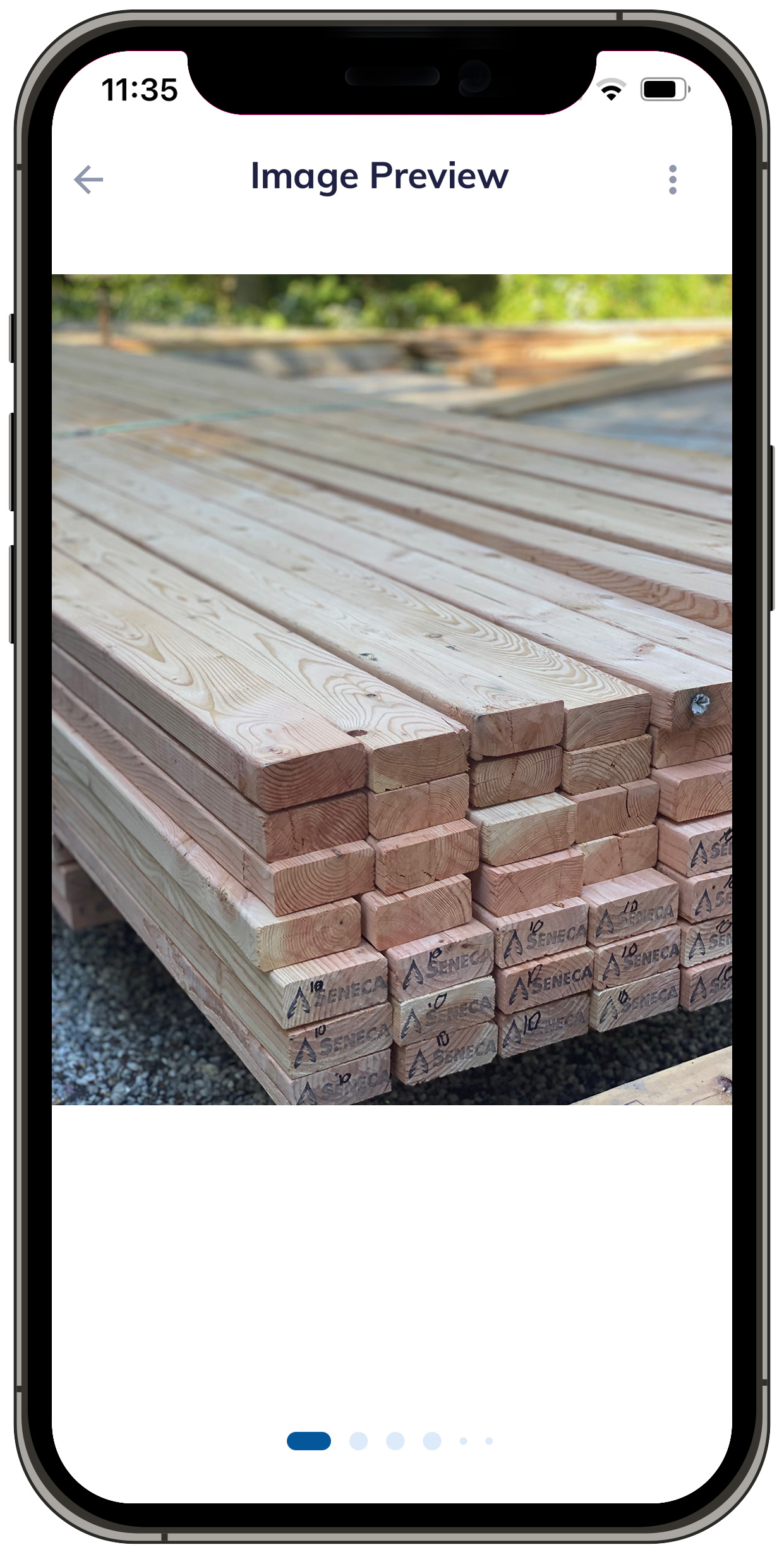
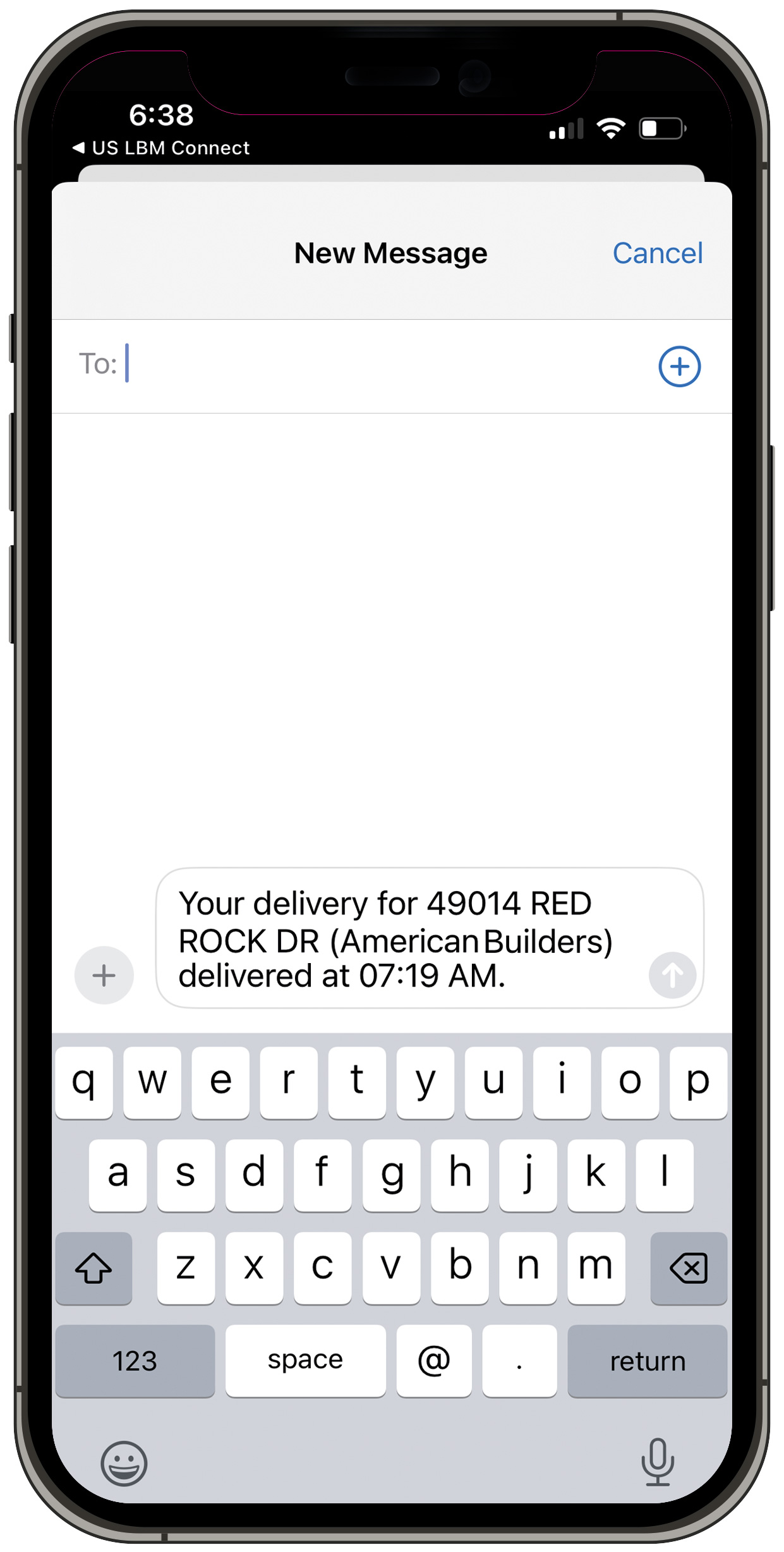
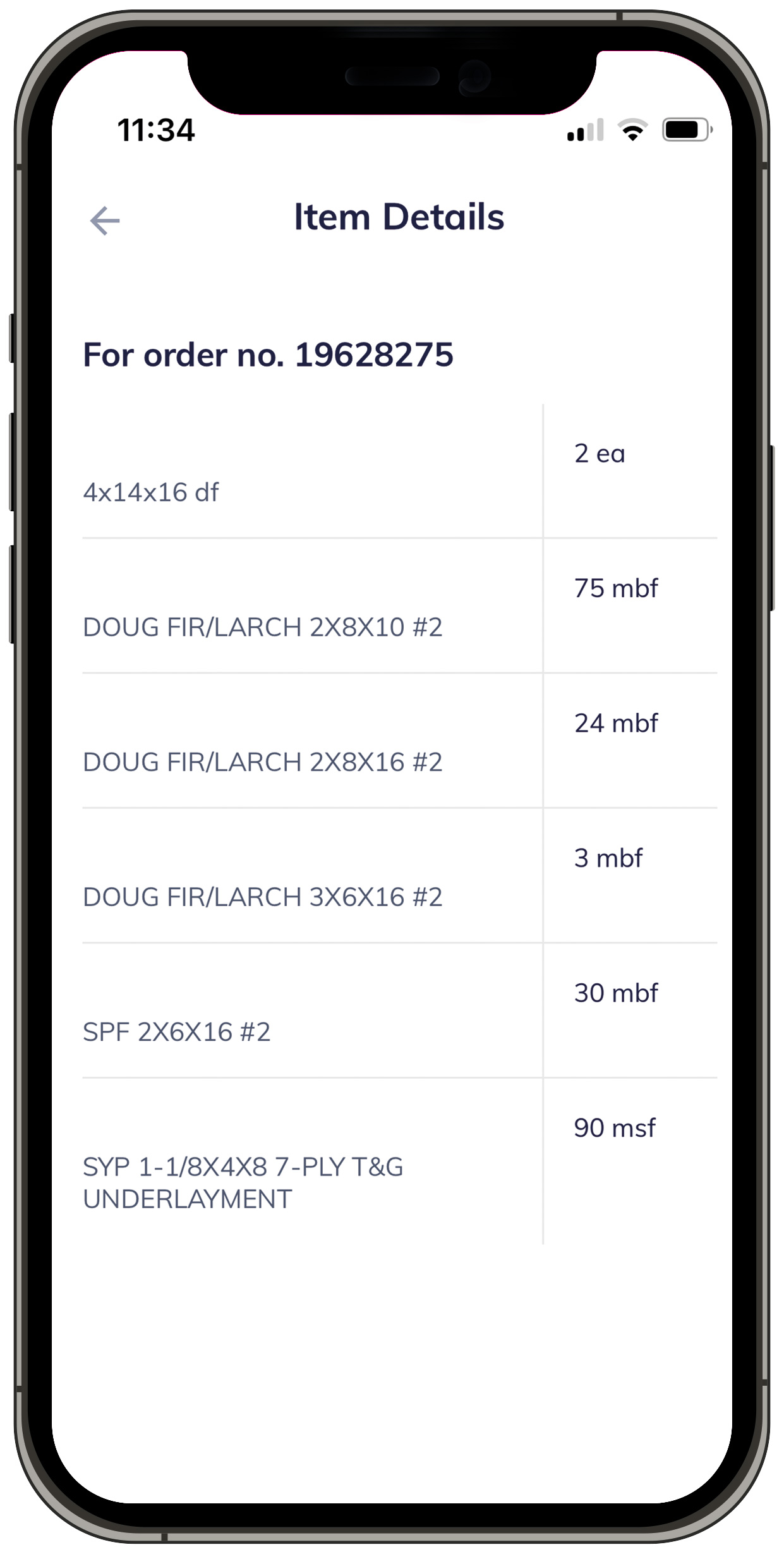
I adapted tablet screens using the same mobile functionality, adjusting only for width and layout to suit larger screens. Additionally, I designed mobile-specific screens for delivery notifications, photo proof upload, and item details—optimized for quick, on-site use with minimal effort.

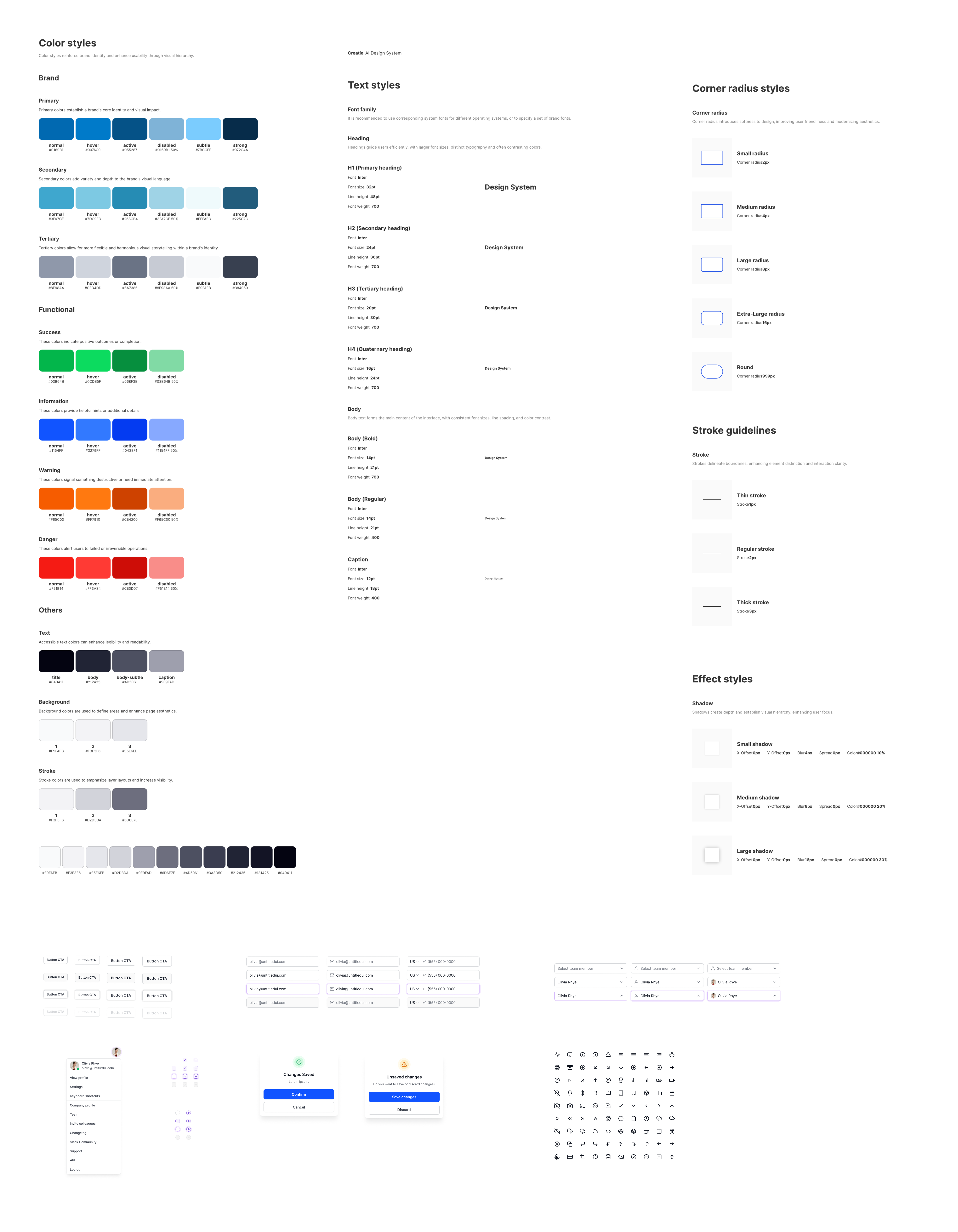
Components & Design System
style guide
Interaction Design Highlights
  • Status-Based Delivery Cards – Delivery cards clearly displayed current status (Enroute, Delivered, Next Stop), ETA, and PO details, allowing users to get critical info at a glance.
  • Photo Proof Upload Flow – Designed a frictionless flow for uploading delivery photos with optional notes or signatures, optimized for jobsite conditions.
  • Quick Issue Reporting – One-tap access to report problems with contextual inputs like photo, description, and order ID auto-linked.
  • Tabbed Information Layouts – Used horizontal tabs to separate delivery info, item list, and delivery images—reducing scroll and visual overload.
  • Billing Drill-Down Design – Allowed users to expand or collapse invoice sections (credits, charges, unapplied cash) to reduce clutter.
  • Mobile-Optimized Navigation – Persistent bottom nav provided one-tap access to key actions like Deliveries, Billing, and Promotions, improving task speed in the field.

Implementation & Testing

I collaborated closely with developers to ensure a smooth transition from Figma designs to functional code. All screens were delivered with detailed specs, interaction notes, and behavior guidelines to support implementation.

I participated in regular UI reviews to fine-tune spacing, mobile responsiveness, and alignment with jobsite use cases. Feedback from real-world users—contractors and site managers—helped us refine flows like issue reporting, delivery tracking, and billing access.

Post-launch, we conducted iterative rounds of internal QA based on real user tasks, ensuring the app held up in actual jobsite scenarios. This led to small but impactful improvements in layout clarity, photo capture flows, and message interactions.

Testing Methods
  • Internal QA using jobsite scenarios
  • UI alignment and consistency checks
  • Dev collaboration and feedback loops
  • Post-launch refinements from user feedback

Outcome & Impact

Results Achieved
  • Improved delivery visibility and reduced update-related calls by 40%
  • Cut issue reporting time by 60% with in-app photo upload and quick-log flow
  • Increased invoice access efficiency—users now retrieve billing data in under 3 taps
  • Enhanced on-site adoption with a task-focused UI, leading to faster crew coordination
Client & User Feedback

"The app makes tracking so much easier—my team doesn’t have to keep calling for updates or dig through emails for invoices.”

The mobile solution is now actively used by contractors and site managers across multiple U.S. regions, including brands under the USLBM umbrella such as Hines, GBS Building Supply, Universal Supply, Wisconsin Building Supply, Poulin building Materials and etc.. Ongoing enhancements continue to be made based on live jobsite feedback from these divisions.